Documentation Index

Entry point for the PKB-theme documentation notes, organized by subject.

Documentation Index

This note maps the documentation base by subject. Each entry links to a dedicated note, and the glossary defines the technical terms that recur across notes. The notes assume a working Hugo site built with PKB-theme: content creation and theme machinery first, then deployment, then the self-hosted services (analytics, ecommerce) the theme integrates with.

Hugo and theme development

Deployment and hosting

Analytics

Ecommerce

Theme components

Glossary

Short definitions of the technical terms that recur across the documentation notes.

Glossary

Terms are listed alphabetically. Each entry gives a short definition followed by links to the notes that cover the term in depth; the glossary disambiguates, the notes explain.

Archetype: the template Hugo uses to seed a new content file created with hugo new. See Creating Posts with Hugo.

Chroma: the syntax highlighter built into Hugo; the theme drives it class-based with generated dark/light style pairs that follow the color-scheme toggle. See How the Hugo System Works, SOTA: Hugo.

Hello, Quarto

Sample Quarto-rendered page: executable Python, R, and Bash blocks rendered to hugo-md with knitr.

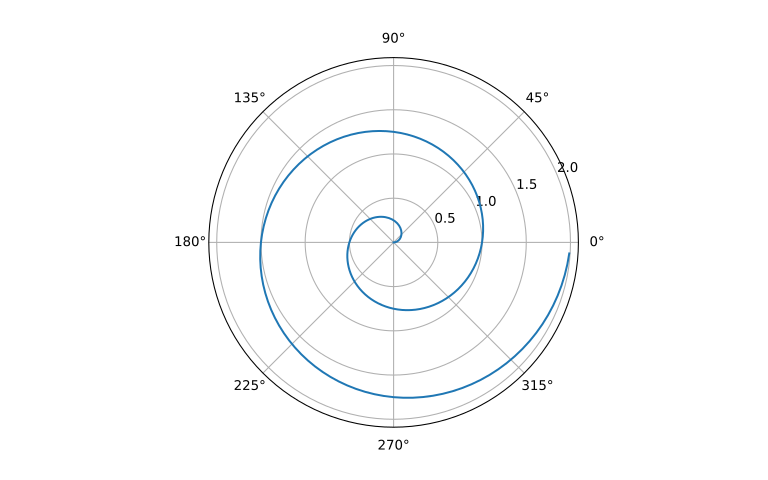
Polar Axis (Python)

A line plot on a polar axis.

Code
import numpy as np
import matplotlib.pyplot as plt

r = np.arange(0, 2, 0.01)
theta = 2 * np.pi * r
fig, ax = plt.subplots(subplot_kw={'projection': 'polar'})
ax.plot(theta, r)
ax.set_rticks([0.5, 1, 1.5, 2])
ax.grid(True)
plt.show()

Figure 1: A line plot on a polar axis

Summary Statistics (R)

Using base R to summarize the cars dataset:

Code
summary(cars)
     speed           dist       
 Min.   : 4.0   Min.   :  2.00  
 1st Qu.:12.0   1st Qu.: 26.00  
 Median :15.0   Median : 36.00  
 Mean   :15.4   Mean   : 42.98  
 3rd Qu.:19.0   3rd Qu.: 56.00  
 Max.   :25.0   Max.   :120.00  

Histogram in R

A basic histogram using base R:

Test on Archetype

A comprehensive test post showcasing various markdown features, components, and theme capabilities including images, tables, code blocks, and references.

This is a comprehensive test post designed to showcase the various features and capabilities of the PKB theme. It includes multiple markdown elements, components, and formatting options to ensure everything renders correctly.

Introduction

Welcome to our test archetype! This post demonstrates how different content types render within the theme. From basic text formatting to complex components like tables, code blocks, and mathematical expressionsaa.Sidenotes are particularly useful for additional context without breaking the reading flow.

Markdown Boilerplate with Sidenotes

A comprehensive boilerplate showcasing all markdown features and sidenote usage

This document demonstrates all standard Markdown features along with proper sidenote usage. This resource is the central reference for all content creators building a Digital Garden or implementing the Zettelkasten Method.

Basic Typography

Effective typography forms the foundation of digital writing. As explained by 11., consistent formatting improves readability. Recent studies 22. show that proper formatting significantly impacts user engagement. As demonstrated in previous research 2, this approach has been validated multiple times.

Creating Posts with Hugo

Complete guide to creating new posts and content using Hugo's archetype system

Hugo provides a powerful content creation system using archetypes and the hugo new command. This guide explains how to create different types of content in your PKB-theme site.

Understanding Hugo’s Content Structure

Hugo organizes content in sections, which correspond to directories under content/. The PKB-theme supports several content types:

  • Posts (content/posts/) - Blog articles and regular content
  • Docs (content/docs/) - Documentation and guides
  • Pages (content/about.md) - Static pages like About, Contact

The hugo new Command

The basic syntax for creating new content is:

Quarto Basics with PKB Theme

Complete guide to creating and publishing Quarto documents with the PKB theme, including setup, configuration, and best practices.

Quarto is an open-source scientific and technical publishing system that works in HUGO. This guide covers everything you need to know to create/display code outputs from code using a Quarto as integration.

What is Quarto?

Quarto enables you to weave together content and executable code into a finished document. It supports:

  • Multiple languages: Python, R, Julia, Observable JS
  • Multiple formats: HTML, PDF, MS Word, presentations, websites
  • Interactive elements: Plots, widgets, and dynamic content
  • Academic features: Citations, cross-references, equations

Installation and Setup

1. Install Quarto

Download and install Quarto from quarto.org:

Hugo SEO Implementation Guide

Complete guide to SEO files, configurations, and best practices implemented in the PKB Hugo theme for optimal search engine visibility.

This guide documents all SEO implementations, files, and configurations added to the PKB Hugo theme to ensure optimal search engine visibility and performance.

Theme Integration Architecture

Hugo Theme SEO Architecture
═══════════════════════════════════════════════════════════════════

                     ┌─────────────────┐
                     │   hugo.toml     │
                     │ (Site Config)   │
                     └─────────┬───────┘
                               │
                ┌──────────────┼──────────────┐
                │              │              │
        ┌───────▼──────┐  ┌────▼────┐  ┌─────▼─────┐
        │ data/seo.yml │  │ Content │  │ Static    │
        │ (SEO Config) │  │ Files   │  │ Assets    │
        └───────┬──────┘  └────┬────┘  └─────┬─────┘
                │              │              │
                └──────────────┼──────────────┘
                               │
                    ┌──────────▼──────────┐
                    │   LAYOUT SYSTEM     │
                    │ ─────────────────── │
                    │ baseof.html         │
                    │ ├─ <head>           │
                    │ │  ├─ head/meta     │
                    │ │  ├─ schema-org    │
                    │ │  └─ preload       │
                    │ └─ <body>           │
                    │    └─ content       │
                    └──────────┬──────────┘
                               │
                    ┌──────────▼──────────┐
                    │   GENERATED HTML    │
                    │ ─────────────────── │
                    │ • Meta Tags         │
                    │ • Schema Markup     │
                    │ • Preloaded Assets  │
                    │ • Optimized Images  │
                    │ • Robots.txt        │
                    │ • Sitemap.xml       │
                    └─────────────────────┘

Build Process:
Hugo native [sitemap] config ──► sitemap.xml
scripts/optimize-images.js  ──► WebP + responsive images
static/robots.txt ──► Crawler directives

SEO Files Created

Core Requirements (Always Needed)

  • /layouts/partials/head/meta.html - Meta tags
  • /layouts/partials/seo/schema-org.html - Structured data
  • /layouts/partials/seo/preload-resources.html - Performance
  • /static/robots.txt - Crawler directives
  • /config/_default/params.toml - SEO configuration

Optional Automation (Node.js Required)

  • /package.json - Only needed for advanced scripts
  • /scripts/optimize-images.js - Image optimization
  • /scripts/seo-audit.js - SEO validation

Basic vs Advanced Setup

Basic Setup (Hugo Only)

# No Node.js required
hugo --gc --minify

Features:

Hosting Your Hugo Site

Step-by-step instructions for deploying Hugo sites on popular hosting platforms

This guide covers how to deploy your Hugo site on various hosting platforms, from static site hosts to cloud providers.

Prerequisites

  • Hugo site ready for deployment
  • Git repository (GitHub, GitLab, etc.)
  • Basic command line knowledge

Quick Comparison

PlatformCostBuild TimeCDNCustom DomainSSL
NetlifyFree tierFast
GitHub PagesFreeMedium
VercelFree tierVery Fast
GitLab PagesFreeMedium
FirebaseFree tierFast

Best for: Beginners, continuous deployment, form handling

GitHub Pages with Hugo

How to deploy your PKB-theme site to GitHub Pages using Hugo

Deploying to GitHub Pages with Hugo

This guide explains how to deploy your PKB-theme site to GitHub Pages using Hugo’s built-in capabilities.

Prerequisites

  • Hugo Extended version installed
  • Git repository initialized
  • GitHub account
  • PKB-theme installed as a submodule

Configuration Steps

  1. Update config.toml

    baseURL = "https://username.github.io/repository-name/"
    theme = "PKB-theme"
    publishDir = "docs"  # Required for GitHub Pages
    
  2. Create GitHub Workflow Create .github/workflows/hugo.yml:

    name: Deploy Hugo site
    
    on:
      push:
        branches:
          - main
    
    jobs:
      deploy:
        runs-on: ubuntu-latest
        steps:
          - uses: actions/checkout@v3
            with:
              submodules: true
              fetch-depth: 0
    
          - name: Setup Hugo
            uses: peaceiris/actions-hugo@v2
            with:
              hugo-version: 'latest'
              extended: true
    
          - name: Build
            run: hugo --minify
    
          - name: Deploy
            uses: peaceiris/actions-gh-pages@v3
            with:
              github_token: ${{ secrets.GITHUB_TOKEN }}
              publish_dir: ./public
    

Repository Settings

  1. Go to repository Settings → Pages
  2. Set Source to:
    • Deploy from a branch
    • Branch: gh-pages (created by the workflow)
    • Folder: / (root)

Local Testing

# Build site
hugo

# Test locally
hugo server

# Deploy changes
git add .
git commit -m "Update site content"
git push origin main

Troubleshooting

Common issues and solutions:

Deploying with exampleSite

Guide for deploying your site using PKB-theme's exampleSite as a template

Deploying with exampleSite

The PKB-theme includes an exampleSite directory that serves as both a demo and a template for your own site.

Quick Start

  1. Copy exampleSite Contents

    cp -r themes/PKB-theme/exampleSite/* .
    
  2. Update Configuration Edit config.toml:

    baseURL = "https://your-username.github.io/your-site/"
    title = "Your Site Title"
    theme = "PKB-theme"
    
  3. Customize Content

    • Modify content in content/ directory
    • Update images in static/ directory
    • Adjust layouts in layouts/ if needed

Directory Structure

The exampleSite provides a complete structure:

exampleSite/
├── config.toml      # Site configuration
├── content/         # Your content
│   ├── docs/        # Documentation pages
│   └── posts/       # Blog posts
├── static/          # Static assets
└── layouts/         # Custom layouts (optional)

Configuration Reference

Key settings in config.toml:

Setting up GitHub Pages

A comprehensive guide to set up GitHub Pages with PKB-theme

Setting up GitHub Pages with PKB-theme

This guide explains how to set up GitHub Pages for your PKB-theme repository.

Important Files

  • _config.yml - Main Jekyll configuration file
  • Gemfile - Ruby dependencies for GitHub Pages
  • index.md - Your homepage content
  • _layouts/ - Theme layout files
  • assets/ - Static files like CSS, images, etc.

Setup Steps

  1. Configure _config.yml

    • Ensure your _config.yml has the correct theme settings:
    remote_theme: username/PKB-theme
    
  2. Enable GitHub Pages

Analytics Configuration

Guide for configuring various analytics providers with PKB-theme

Analytics Configuration for PKB-theme

This document describes how to configure various self-hosted analytics options for your PKB-theme website.

Available Analytics Providers

PKB-theme supports the following privacy-focused analytics providers:

  • Matomo (formerly Piwik)
  • Plausible
  • Umami
  • Fathom Lite
  • Shynet

Configuration

Add the following to your config.toml or hugo.toml file:

[params.analytics]
  # Uncomment and configure the analytics system you want to use
  
  # Matomo Analytics
  # matomo = true
  # matomoSiteId = "1"
  # matomoURL = "https://analytics.yourdomain.com/"
  
  # Plausible Analytics
  # plausible = true
  # plausibleDomain = "yourdomain.com"
  # plausibleScriptSrc = "https://plausible.io/js/script.js"
  
  # Umami Analytics
  # umami = true
  # umamiWebsiteId = "XXXXXXXX-XXXX-XXXX-XXXX-XXXXXXXXXXXX"
  # umamiScriptSrc = "https://analytics.yourdomain.com/umami.js"
  
  # Fathom Analytics
  # fathom = true
  # fathomSiteId = "ABCDEFGH"
  # fathomScriptSrc = "https://cdn.usefathom.com/script.js"
  
  # Shynet Analytics
  # shynet = true
  # shynetURL = "https://analytics.yourdomain.com"
  # shynetUUID = "XXXXXXXX-XXXX-XXXX-XXXX-XXXXXXXXXXXX"

Detailed Installation Guides

For detailed installation instructions, refer to these content pages:

Matomo Analytics Setup Guide

Comprehensive guide for setting up Matomo Analytics with your PKB-theme site

Matomo Analytics for PKB-theme

This guide provides detailed instructions for integrating Matomo Analytics with your PKB-theme. Matomo is a powerful, privacy-focused alternative to Google Analytics that gives you complete control over your data.

Why Choose Matomo?

Matomo (formerly Piwik) offers several advantages:

  • Full data ownership: All data stays on your server
  • Privacy compliance: Built-in GDPR, CCPA, and cookie law compliance tools
  • Feature parity: Similar features to Google Analytics
  • No data limits: Analyze unlimited websites and users
  • Customizable: Extensive API and plugin system

Installation Options

  1. Create a docker-compose.yml file:
flowchart TB
 subgraph subGraph0["PKB-theme Project"]
        PKB["/home/gespitia/projects/PKB-theme/"]
        CONFIG_TOML["config/_default/hugo.toml<br>🔧 Analytics Configuration"]
        SEO_YML["data/seo.yml<br>🚀 Performance Config"]
  end
 subgraph subGraph1["Core Docker Configuration"]
        DOCKER_COMPOSE["docker-compose.yml<br>🐳 Container Orchestration"]
        DOCKER_OVERRIDE["docker-compose.override.yml<br>🔧 Development Overrides"]
        ENV_FILE[".env<br>🔐 Environment Variables"]
  end
 subgraph subGraph2["Database Configuration"]
        POSTGRES_CONF["postgresql.conf<br>🗄️ Database Tuning"]
        POSTGRES_INIT["postgres-init/01-init.sql<br>📊 Database Setup"]
  end
 subgraph subGraph3["Cache Configuration"]
        REDIS_CONF["redis.conf<br>⚡ Cache Settings"]
  end
 subgraph subGraph4["Backup & Monitoring"]
        BACKUP_SCRIPT["backup-script.sh<br>💾 Database Backup"]
        BACKUP_CLEANUP["backup-cleanup.sh<br>🧹 Cleanup Script"]
        MONITOR_SCRIPT["monitor-matomo.sh<br>📊 Health Check"]
  end
 subgraph subGraph5["Runtime Directories (Auto-created)"]
        CONFIG_DIR["config/<br>📁 Matomo Config"]
        LOGS_DIR["logs/<br>📋 Application Logs"]
        PLUGINS_DIR["plugins/<br>🔌 Custom Plugins"]
        BACKUPS_DIR["backups/<br>💾 Database Backups"]
  end
 subgraph subGraph6["Existing Config Files"]
        MATOMO_CONFIG["config/config.ini.php<br>⚙️ Matomo Settings (Auto-generated)"]
        GLOBAL_CONFIG["config/global.ini.php<br>📋 Global Settings (Read-only)"]
        PLUGIN_CONFIGS["plugins/*/config/<br>🔌 Plugin Configurations"]
  end
 subgraph subGraph7["Matomo Analytics Project"]
        MATOMO_ROOT["/home/gespitia/projects/matomo-analytics/"]
        subGraph1
        subGraph2
        subGraph3
        subGraph4
        subGraph5
        subGraph6
  end
 subgraph subGraph8["System Configuration (Optional)"]
        NGINX_CONF["nginx-analytics.conf<br>🌐 Reverse Proxy"]
        SYSTEM_NGINX["/etc/nginx/sites-available/<br>📁 System Nginx Config"]
        SYSTEMD_SERVICE["/etc/systemd/system/matomo-docker.service<br>🔄 Auto-start Service"]
        CRON_JOBS["/etc/cron.d/matomo<br>⏰ Scheduled Tasks"]
  end
 subgraph subGraph9["Project Structure Overview"]
        subGraph0
        subGraph7
        subGraph8
  end

    PKB --> CONFIG_TOML & SEO_YML
    MATOMO_ROOT --> DOCKER_COMPOSE & DOCKER_OVERRIDE & ENV_FILE & POSTGRES_CONF & POSTGRES_INIT & REDIS_CONF & BACKUP_SCRIPT & BACKUP_CLEANUP & MONITOR_SCRIPT
    MATOMO_ROOT -.-> CONFIG_DIR & LOGS_DIR & PLUGINS_DIR & BACKUPS_DIR
    CONFIG_DIR --> MATOMO_CONFIG & GLOBAL_CONFIG
    PLUGINS_DIR --> PLUGIN_CONFIGS
    NGINX_CONF -.-> SYSTEM_NGINX
    ENV_FILE -.-> DOCKER_COMPOSE
    POSTGRES_CONF -.-> DOCKER_COMPOSE
    REDIS_CONF -.-> DOCKER_COMPOSE
    BACKUP_SCRIPT -.-> DOCKER_COMPOSE & CRON_JOBS
    BACKUP_CLEANUP -.-> DOCKER_COMPOSE
    POSTGRES_INIT -.-> DOCKER_COMPOSE
    CONFIG_TOML -.-> NGINX_CONF
    NGINX_CONF -.-> SYSTEMD_SERVICE
    MONITOR_SCRIPT -.-> CRON_JOBS
    
     CONFIG_TOML:::pkb
     SEO_YML:::pkb
     DOCKER_COMPOSE:::coreConfig
     DOCKER_OVERRIDE:::coreConfig
     ENV_FILE:::coreConfig
     POSTGRES_CONF:::dbConfig
     POSTGRES_INIT:::dbConfig
     REDIS_CONF:::cacheConfig
     BACKUP_SCRIPT:::monitoring
     BACKUP_CLEANUP:::monitoring
     MONITOR_SCRIPT:::monitoring
     CONFIG_DIR:::runtime
     LOGS_DIR:::runtime
     PLUGINS_DIR:::runtime
     BACKUPS_DIR:::runtime
     MATOMO_CONFIG:::existing
     GLOBAL_CONFIG:::existing
     PLUGIN_CONFIGS:::existing
     NGINX_CONF:::system
     SYSTEMD_SERVICE:::system
     CRON_JOBS:::system
     
    classDef coreConfig fill:#e1f5fe,stroke:#01579b,stroke-width:2px
    classDef dbConfig fill:#f3e5f5,stroke:#4a148c,stroke-width:2px
    classDef cacheConfig fill:#fff3e0,stroke:#e65100,stroke-width:2px
    classDef monitoring fill:#e8f5e8,stroke:#1b5e20,stroke-width:2px
    classDef runtime fill:#fce4ec,stroke:#880e4f,stroke-width:2px
    classDef existing fill:#f3e5f5,stroke:#6a1b9a,stroke-width:2px
    classDef system fill:#fff8e1,stroke:#f57f17,stroke-width:2px
    classDef pkb fill:#e0f2f1,stroke:#00695c,stroke-width:2px

Diagram Internet to files

flowchart TB

Here are the suggested file locations and names for each configuration:

Self-Hosted Analytics for PKB-theme

A comprehensive guide for implementing privacy-focused, FOSS analytics in your PKB-theme site

Self-Hosted Analytics for PKB-theme

This guide helps you implement visitor analytics for your PKB-theme using privacy-respecting, FOSS (Free and Open Source Software) solutions. Unlike commercial analytics platforms that collect excessive data and track users across sites, these tools focus on essential metrics while respecting user privacy.

Analytics Solutions Comparison

SolutionTechnologiesSizePrivacy FeaturesComplexityKey AdvantagesLimitations
PlausibleElixir/PostgreSQL<1KBNo cookies, GDPR compliantEasyLightweight script, simple dashboardLimited segmentation compared to Matomo
UmamiNext.js/PostgreSQL~2KBNo cookies, GDPR compliantEasyEasy deployment options, multiple usersFewer features than Matomo
MatomoPHP/MySQL~20KBConfigurable tracking, opt-outMediumFeature-rich, similar to GARequires more resources
Fathom LiteGo/SQLite~1KBMinimal data collectionEasyExtremely lightweightLimited features
ShynetPython/Django~0KB*Can work without JSMediumWorks with JS disabledLess intuitive interface

*Shynet can use tracking pixels instead of JavaScript