Documentation Index
This note maps the documentation base by subject. Each entry links to a dedicated note, and the glossary defines the technical terms that recur across notes. The notes assume a working Hugo site built with PKB-theme: content creation and theme machinery first, then deployment, then the self-hosted services (analytics, ecommerce) the theme integrates with.
Hugo and theme development
- How the Hugo System Works (2026-07-29): the dated architecture reference for the whole setup: version floor, module and config model, templates, content pipeline, and CI.
- Creating Posts with Hugo: the content workflow, from archetypes and front matter to page bundles.
- Quarto Basics with PKB Theme: authoring and publishing Quarto documents, with the Quarto Test Sample showing a rendered
.qmd page. - Hugo SEO Implementation Guide: the meta tags, Open Graph, JSON-LD, and sitemap machinery built into the theme.
- Development Tips: day-to-day practices for working on the theme itself.
- SOTA: Hugo Static Site Generator: a fully sourced survey of Hugo through v0.164.0, with an upgrade plan grounded against this theme.
Deployment and hosting
Analytics
Ecommerce
Theme components
Dated architecture reference for the PKB-theme Hugo system: version floor, module and config model, template lookup, content pipeline, feature subsystems, CI, and known quirks.
How the Hugo System Works (as of 2026-07-29)
This note documents the Hugo architecture of PKB-theme as it stands today, after the alignment with Hugo v0.164.0. It is a dated snapshot: Hugo moves quickly, so check the version floor and the SOTA survey before relying on details here.
Version floor and why
The theme requires Hugo v0.164.0 (theme.toml min_version, CI pin, README). The floor is set by four features the theme now depends on: useEmbedded render-hook enums (v0.148.0), the locale config key replacing languageCode (v0.158.0), per-format imaging config plus [imaging.meta] (v0.163.0), and Chroma dark/light style pairs (v0.164.0). The v0.146 template-system rewrite shapes the entire layouts/ tree.
Short definitions of the technical terms that recur across the documentation notes.
Glossary
Terms are listed alphabetically. Each entry gives a short definition followed by links to the notes that cover the term in depth; the glossary disambiguates, the notes explain.
Archetype: the template Hugo uses to seed a new content file created with hugo new. See Creating Posts with Hugo.
Chroma: the syntax highlighter built into Hugo; the theme drives it class-based with generated dark/light style pairs that follow the color-scheme toggle. See How the Hugo System Works, SOTA: Hugo.
State-of-the-art survey of Hugo as of July 2026 (latest: v0.164.0), with every finding sourced and an upgrade plan grounded against the PKB-theme repository.
SOTA: Hugo Static Site Generator
As of 2026-07-28. Mode: survey (repo-grounded against PKB-theme). Freshness: findings older than 12 months are flagged [STALE]. Every numbered claim ends with its source and access date; anything unverifiable is marked [UNVERIFIED].
TL;DR
- The latest Hugo release is v0.164.0 (2026-07-06). Roughly 25 minor releases shipped in the last 19 months; the project is very actively maintained, still centered on Bjørn Erik Pedersen.
- The big theme-author events of the period: the v0.146 template-system rewrite (new
layouts/ structure), v0.148 render-hook useEmbedded enums (replacing enableDefault), the v0.156 mass removal of long-deprecated APIs, v0.158 languageCode → locale, v0.163 per-format imaging config, and v0.164 resources.PostProcess → templates.Defer. - PKB-theme’s in-progress migration to
useEmbedded = 'fallback' is correct (minimum version v0.148.0, verified). But its CI pins Hugo 0.123.7 / 0.128.0 - below the theme’s own min_version = "0.136.0" and far below the README’s new “v0.148+” claim. Aligning versions is the top action. - Concrete code updates for this repo: replace
.Page.Scratch (deprecated v0.138.0) in the cite/sidenote shortcodes, move the global imaging.quality into per-format blocks, rename languageCode → locale, and audit two non-standard render hooks (render-inline.html, render-paragraph.html) that are not part of Hugo’s documented hook set.
Landscape
Release train & maintenance
Hugo ships a minor release roughly every 3–5 weeks with patch releases in between. From v0.140.0 (2024-12-17) to v0.164.0 (2026-07-06) there were 25 minor lines, the majority of which introduced at least one deprecation or small breaking change - Hugo deprecates aggressively and removes on a ~6–18 month horizon. Maintenance is healthy but concentrated: bep accounts for ~60–68% of commits; jmooring is the most visible secondary maintainer; ~210 open issues with closure rate exceeding creation rate over the last year. License: Apache-2.0. No formal public roadmap - direction is visible via GitHub milestones (v0.165.0 is the current one). (releases, contributors, milestone 370, accessed 2026-07-28)
Sample Quarto-rendered page: executable Python, R, and Bash blocks rendered to hugo-md with knitr.
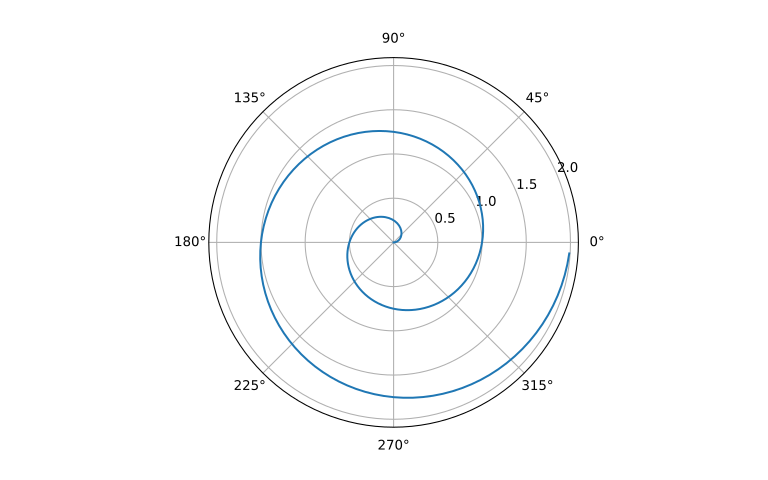
Polar Axis (Python)
A line plot on a polar axis.
Code
import numpy as np
import matplotlib.pyplot as plt

r = np.arange(0, 2, 0.01)
theta = 2 * np.pi * r
fig, ax = plt.subplots(subplot_kw={'projection': 'polar'})
ax.plot(theta, r)
ax.set_rticks([0.5, 1, 1.5, 2])
ax.grid(True)
plt.show()
Summary Statistics (R)
Using base R to summarize the cars dataset:
Code
     speed           dist
 Min.   : 4.0   Min.   :  2.00
 1st Qu.:12.0   1st Qu.: 26.00
 Median :15.0   Median : 36.00
 Mean   :15.4   Mean   : 42.98
 3rd Qu.:19.0   3rd Qu.: 56.00
 Max.   :25.0   Max.   :120.00
Histogram in R
A basic histogram using base R:
Complete guide to styling and customizing codeblocks in the PKB theme
This guide covers all the ways you can style and customize codeblocks in the PKB theme, from basic syntax highlighting to advanced features like line numbers and copy buttons.
Basic Syntax Highlighting
The theme supports syntax highlighting for numerous programming languages. Simply specify the language after the opening triple backticks:
function greet(name) {
    console.log(`Hello, ${name}!`);
}
def fibonacci(n):
    if n <= 1:
        return n
    return fibonacci(n-1) + fibonacci(n-2)
package main

import "fmt"

func main() {
    fmt.Println("Hello, World!")
}
Inline Code
Use single backticks for inline code: const variable = "value" or git commit -m "message".
Complete guide to using the gallery slider component with examples and customization options
The Gallery Slider component provides an elegant way to display multiple images with navigation controls, thumbnails, and captions. This guide covers everything from basic usage to advanced customization.
File Organization for Images
Understanding how to organize your images is crucial for effective gallery management:
Hugo Site Structure
├── static/
│   └── images/
│       ├── docs/
│       │   └── gallery-slider-doc/
│       │       ├── landscape-1.jpg
│       │       ├── landscape-2.jpg
│       │       ├── portrait-1.jpg
│       │       └── thumb-landscape-1.jpg  ← Optional thumbnails
│       ├── gallery/
│       │   ├── nature/
│       │   │   ├── forest-1.jpg
│       │   │   └── forest-2.jpg
│       │   └── architecture/
│       │       ├── building-1.jpg
│       │       └── building-2.jpg
│       └── posts/
│           └── my-post/
│               ├── hero.jpg
│               └── detail.jpg
├── content/
│   └── posts/
│       └── my-gallery-post.md  ← Your content file
└── layouts/
    └── partials/
        └── gallery-slider.html  ← Component template
aa.Organization Tips: Group images by topic or post in subdirectories. Use consistent naming conventions like image-name.jpg and optional thumb-image-name.jpg for custom thumbnails.URL Structure
- Local images:
/images/docs/gallery-slider-doc/landscape-1.jpg - Web images:
https://example.com/image.jpg - Relative paths: Always start with
/ for Hugo static files
Basic Gallery Usage
Simple Image Gallery
Here’s a basic gallery with local images:
Complete guide to Text-to-Speech implementation using browser-native APIs, voice creation, and cross-browser compatibility strategies.
Text-to-Speech: From Browser APIs to Voice Creation
Text-to-Speech (TTS) technology has evolved from expensive specialized hardware to ubiquitous browser-native capabilities. This comprehensive guide explores how speech synthesis works, the underlying browser APIs, and practical implementation strategies across different platforms.
How Speech is Created
The Speech Synthesis Pipeline
Modern TTS systems follow a sophisticated multi-stage process to convert text into natural-sounding speech:
Text Input → Text Analysis → Phonetic Conversion → Audio Generation → Output
1. Text Analysis and Preprocessing
- Text normalization: Converting abbreviations, numbers, dates into readable format
- Sentence segmentation: Breaking text into manageable chunks
- Token classification: Identifying proper nouns, acronyms, punctuation
2. Linguistic Analysis
- Part-of-speech tagging: Determining grammatical roles
- Prosodic analysis: Planning stress, rhythm, and intonation patterns
- Phonetic transcription: Converting words to phoneme sequences
3. Audio Synthesis Methods
Concatenative Synthesis:
How to customize the PKB-theme color palette using CSS variables, with readability and contrast guidance.
When customizing a theme, readability is achieved with a contrasting color palette.
This can be easily done by having a grayscaled theme with very different grades of Luminance (eg. black background, white letters (dark theme) or vice-versa (light theme)), end of the story.
But if you want to add colors, the alternatives are more nuanced and myriad.
Firstly, make sure you have a local copy of the CSS variables:
mkdir -p assets/css/global/variables/
curl -L -o assets/css/global/variables/core.css https://github.com/stradichenko/PKB-theme/raw/main/assets/css/global/variables/core.css
We suggest the following strategy:
Complete guide to creating new posts and content using Hugo's archetype system
Hugo provides a powerful content creation system using archetypes and the hugo new command. This guide explains how to create different types of content in your PKB-theme site.
Understanding Hugo’s Content Structure
Hugo organizes content in sections, which correspond to directories under content/. The PKB-theme supports several content types:
- Posts (
content/posts/) - Blog articles and regular content - Docs (
content/docs/) - Documentation and guides - Pages (
content/about.md) - Static pages like About, Contact
The hugo new Command
The basic syntax for creating new content is:
Complete guide to creating and publishing Quarto documents with the PKB theme, including setup, configuration, and best practices.
Quarto is an open-source scientific and technical publishing system that works in HUGO. This guide covers everything you need to know to create/display code outputs from code using a Quarto as integration.
What is Quarto?
Quarto enables you to weave together content and executable code into a finished document. It supports:
- Multiple languages: Python, R, Julia, Observable JS
- Multiple formats: HTML, PDF, MS Word, presentations, websites
- Interactive elements: Plots, widgets, and dynamic content
- Academic features: Citations, cross-references, equations
Installation and Setup
1. Install Quarto
Download and install Quarto from quarto.org:
Complete guide to configuring Quarto document metadata, including YAML front matter, execution options, and PKB theme integration.
Understanding Quarto metadata is crucial for creating well-structured, properly configured documents that integrate seamlessly with the PKB theme. Take into account that to adequately deploy a site with this HUGO, other steps are necessary. This guide covers everything from basic YAML syntax to advanced configuration options for the qmd metadata necessary as a first step.
Quarto metadata is defined in YAML format at the beginning of your document, enclosed between triple dashes (---). It controls:
Complete guide to SEO files, configurations, and best practices implemented in the PKB Hugo theme for optimal search engine visibility.
This guide documents all SEO implementations, files, and configurations added to the PKB Hugo theme to ensure optimal search engine visibility and performance.
Theme Integration Architecture
Hugo Theme SEO Architecture
═══════════════════════════════════════════════════════════════════

                     ┌─────────────────┐
                     │   hugo.toml     │
                     │ (Site Config)   │
                     └─────────┬───────┘
                               │
                ┌──────────────┼──────────────┐
                │              │              │
        ┌───────▼──────┐  ┌────▼────┐  ┌─────▼─────┐
        │ data/seo.yml │  │ Content │  │ Static    │
        │ (SEO Config) │  │ Files   │  │ Assets    │
        └───────┬──────┘  └────┬────┘  └─────┬─────┘
                │              │              │
                └──────────────┼──────────────┘
                               │
                    ┌──────────▼──────────┐
                    │   LAYOUT SYSTEM     │
                    │ ─────────────────── │
                    │ baseof.html         │
                    │ ├─ <head>           │
                    │ │  ├─ head/meta     │
                    │ │  ├─ schema-org    │
                    │ │  └─ preload       │
                    │ └─ <body>           │
                    │    └─ content       │
                    └──────────┬──────────┘
                               │
                    ┌──────────▼──────────┐
                    │   GENERATED HTML    │
                    │ ─────────────────── │
                    │ • Meta Tags         │
                    │ • Schema Markup     │
                    │ • Preloaded Assets  │
                    │ • Optimized Images  │
                    │ • Robots.txt        │
                    │ • Sitemap.xml       │
                    └─────────────────────┘

Build Process:
Hugo native [sitemap] config ──► sitemap.xml
scripts/optimize-images.js  ──► WebP + responsive images
static/robots.txt ──► Crawler directives
SEO Files Created
Core Requirements (Always Needed)
/layouts/partials/head/meta.html - Meta tags/layouts/partials/seo/schema-org.html - Structured data/layouts/partials/seo/preload-resources.html - Performance/static/robots.txt - Crawler directives/config/_default/params.toml - SEO configuration
Optional Automation (Node.js Required)
/package.json - Only needed for advanced scripts/scripts/optimize-images.js - Image optimization/scripts/seo-audit.js - SEO validation
Basic vs Advanced Setup
Basic Setup (Hugo Only)
# No Node.js required
hugo --gc --minify
Features:
Step-by-step instructions for deploying Hugo sites on popular hosting platforms
This guide covers how to deploy your Hugo site on various hosting platforms, from static site hosts to cloud providers.
Prerequisites
- Hugo site ready for deployment
- Git repository (GitHub, GitLab, etc.)
- Basic command line knowledge
Quick Comparison
| Platform | Cost | Build Time | CDN | Custom Domain | SSL |
|---|
| Netlify | Free tier | Fast | ✅ | ✅ | ✅ |
| GitHub Pages | Free | Medium | ✅ | ✅ | ✅ |
| Vercel | Free tier | Very Fast | ✅ | ✅ | ✅ |
| GitLab Pages | Free | Medium | ✅ | ✅ | ✅ |
| Firebase | Free tier | Fast | ✅ | ✅ | ✅ |
Netlify (Recommended)
Best for: Beginners, continuous deployment, form handling
Developer-focused guide for implementing and integrating Saleor headless commerce platform with your PKB-theme project
Setting Up Saleor with PKB-theme
This guide provides detailed instructions for developers to install, configure, and integrate Saleor - a modern, GraphQL-first headless commerce platform - with your PKB-theme knowledge base or blog.
Introduction to Saleor
Saleor is a headless e-commerce platform built with Python, Django, and GraphQL. Unlike traditional e-commerce systems, Saleor separates the backend (data and business logic) from the frontend (user interface), allowing for more flexible and customizable implementations.
Comprehensive guide for installing and integrating PrestaShop with your PKB-theme project
Setting Up PrestaShop with PKB-theme
This guide walks you through the process of installing, configuring, and integrating PrestaShop with your PKB-theme knowledge base or blog site.
Prerequisites
Before beginning the installation, ensure your environment meets these requirements:
- Web server (Apache, Nginx) with PHP 7.4+ (PHP 8.0+ recommended)
- MySQL 5.6+ or MariaDB 10.0+
- PHP extensions: GD, cURL, SimpleXML, DOM, Zip, PDO, and Mcrypt
- At least 250MB of disk space
- Server memory limit of at least 256MB
- FTP or SSH access to your server
- Database credentials
Installation Process
Step 1: Server Preparation
Create a dedicated subdomain (recommended) or subdirectory for your store:
Step-by-step guide for setting up and integrating OpenCart with your PKB-theme project
Setting Up OpenCart with PKB-theme
This guide provides comprehensive instructions for installing, configuring, and integrating OpenCart with your knowledge base or blog built with PKB-theme.
Prerequisites
Before beginning the installation, ensure you have:
- Web server with PHP 7.3+ and MySQL 5.6+
- cURL and ZIP PHP extensions enabled
- At least 100MB of disk space
- FTP or SSH access to your server
- Database credentials
- Ability to create subdomains or subdirectories
Installation Process
Step 1: Prepare Your Server Environment
Create a dedicated subdomain (recommended) or subdirectory for your store:
A comprehensive guide to self-hosted and open-source ecommerce platforms for creating independent online stores
Self-Hosted Ecommerce Solutions
This guide introduces privacy-respecting, self-hosted alternatives to commercial ecommerce platforms. These Free and Open Source Software (FOSS) solutions give you complete control over your online store without vendor lock-in or excessive fees.
Why Choose Self-Hosted Ecommerce?
Self-hosting your ecommerce platform offers several advantages:
- Complete Ownership: Full control over your store’s data, appearance, and functionality
- Privacy Focused: No third-party tracking or data collection unless you choose to add it
- No Revenue Sharing: Avoid platform fees that take a percentage of each sale
- Unlimited Customization: Modify any aspect of your store’s code to match your exact requirements
- Scalability Options: Scale your infrastructure as your business grows
- Integration Freedom: Connect with any payment processor, shipping provider, or third-party service
- Community Support: Access large communities of developers and store owners
Ecommerce Solutions Comparison
| Solution | Technology | Features | Complexity | Scalability | Freemium Aspects | Best For | License |
|---|
| WooCommerce | WordPress/PHP | Extensive | Low-Medium | Medium | Core is free, many premium extensions | Small-Medium businesses already using WordPress | GPLv3 |
| PrestaShop | PHP/MySQL | Comprehensive | Medium | Medium-High | Free core, marketplace primarily offers paid modules | Small-Medium businesses in Europe | OSL 3.0 |
| OpenCart | PHP/MySQL | Good | Low | Medium | Core is free, mix of free/paid extensions | Beginners, small stores | GPLv3 |
| Magento Open Source | PHP/MySQL | Enterprise-grade | High | Excellent | Distinct from paid Adobe Commerce version | Larger businesses with technical teams | OSL 3.0 |
| Saleor | Python/GraphQL | Modern API-first | Medium | Excellent | Fully open-source, paid cloud option available | Headless commerce, custom frontends | BSD |
| Medusa | Node.js | API-first, modular | Medium | Very Good | Fully open-source, paid cloud offering | Developers wanting customization | MIT |
| Sylius | PHP/Symfony | Flexible | Medium-High | Very Good | Open-source core, enterprise version available | Custom business requirements | MIT |
| Bagisto | Laravel/PHP | Comprehensive | Medium | Good | Free core, paid themes and extensions | Laravel developers | MIT |
| OroCommerce | PHP/Symfony | B2B-focused | High | Excellent | Community vs Enterprise edition limitations | B2B businesses with complex requirements | OSL 3.0 |
| Reaction Commerce | Node.js/GraphQL | API-first, microservices | High | Excellent | Open source, with paid hosting options | Enterprise, custom solutions | GPL-v3 |
Detailed Solution Overviews
WooCommerce
WooCommerce is the most popular ecommerce platform, powering over 29% of all online stores.
Development tips and useful commands for PKB-theme development
Development Tips
Serving exampleSite
For theme development, use this command to serve the exampleSite with debug options:
hugo server \
  --source exampleSite \  # Point to exampleSite directory
  --noHTTPCache \         # Disable HTTP caching
  --renderToMemory \      # Render to memory
  --disableFastRender \   # Disable fast render
  --ignoreCache \         # Ignore cache
  --gc \                  # Run garbage collection
  --logLevel debug \      # Set debug log level
  -D                      # Include draft posts
Command Explanation
--source exampleSite: Serves the example site instead of the main project--noHTTPCache: Prevents browser caching during development--renderToMemory: Renders pages in memory for faster development--disableFastRender: Forces full re-render of changed pages--ignoreCache: Ignores the cache when rebuilding--gc: Runs garbage collection after builds--logLevel debug: Shows detailed debug information-D: Includes draft content
Local Testing
For production testing, remove debug flags:
How to deploy your PKB-theme site to GitHub Pages using Hugo
Deploying to GitHub Pages with Hugo
This guide explains how to deploy your PKB-theme site to GitHub Pages using Hugo’s built-in capabilities.
Prerequisites
- Hugo Extended version installed
- Git repository initialized
- GitHub account
- PKB-theme installed as a submodule
Configuration Steps
Update config.toml
baseURL = "https://username.github.io/repository-name/"
theme = "PKB-theme"
publishDir = "docs"  # Required for GitHub Pages
Create GitHub Workflow
Create .github/workflows/hugo.yml:
name: Deploy Hugo site

on:
  push:
    branches:
      - main

jobs:
  deploy:
    runs-on: ubuntu-latest
    steps:
      - uses: actions/checkout@v3
        with:
          submodules: true
          fetch-depth: 0

      - name: Setup Hugo
        uses: peaceiris/actions-hugo@v2
        with:
          hugo-version: 'latest'
          extended: true

      - name: Build
        run: hugo --minify

      - name: Deploy
        uses: peaceiris/actions-gh-pages@v3
        with:
          github_token: ${{ secrets.GITHUB_TOKEN }}
          publish_dir: ./public
Repository Settings
- Go to repository Settings → Pages
- Set Source to:
- Deploy from a branch
- Branch: gh-pages (created by the workflow)
- Folder: / (root)
Local Testing
# Build site
hugo

# Test locally
hugo server

# Deploy changes
git add .
git commit -m "Update site content"
git push origin main
Troubleshooting
Common issues and solutions:
Guide for deploying your site using PKB-theme's exampleSite as a template
Deploying with exampleSite
The PKB-theme includes an exampleSite directory that serves as both a demo and a template for your own site.
Quick Start
Copy exampleSite Contents
cp -r themes/PKB-theme/exampleSite/* .
Update Configuration
Edit config.toml:
baseURL = "https://your-username.github.io/your-site/"
title = "Your Site Title"
theme = "PKB-theme"
Customize Content
- Modify content in
content/ directory - Update images in
static/ directory - Adjust layouts in
layouts/ if needed
Directory Structure
The exampleSite provides a complete structure:
exampleSite/
├── config.toml      # Site configuration
├── content/         # Your content
│   ├── docs/        # Documentation pages
│   └── posts/       # Blog posts
├── static/          # Static assets
└── layouts/         # Custom layouts (optional)
Configuration Reference
Key settings in config.toml:
A comprehensive guide for setting up reverse proxies for self-hosted analytics solutions
Reverse Proxy Setup for Self-Hosted Analytics
This guide explains how to properly configure reverse proxies for your self-hosted analytics solutions. A reverse proxy sits between users and your analytics server, providing benefits like SSL termination, load balancing, and additional security.
Comparison of Reverse Proxy Solutions
| Solution | Ease of Config | Performance | Features | SSL Support | Auto Config | Best For |
|---|
| Nginx | Medium | Excellent | Extensive | Manual config | No | High-traffic sites, complex setups |
| Caddy | Very Easy | Good | Good | Automatic HTTPS | Yes | Beginners, quick setup |
| Traefik | Medium | Very Good | Extensive | Automatic HTTPS | Yes | Container environments |
| HAProxy | Complex | Excellent | Advanced | Manual config | No | High availability, load balancing |
| Apache | Medium | Good | Extensive | Manual config | No | Compatibility with existing Apache setups |
General Setup Principles
When setting up a reverse proxy for analytics, consider these key principles:
A comprehensive guide to set up GitHub Pages with PKB-theme
Setting up GitHub Pages with PKB-theme
This guide explains how to set up GitHub Pages for your PKB-theme repository.
Important Files
_config.yml - Main Jekyll configuration fileGemfile - Ruby dependencies for GitHub Pagesindex.md - Your homepage content_layouts/ - Theme layout filesassets/ - Static files like CSS, images, etc.
Setup Steps
Configure _config.yml
- Ensure your
_config.yml has the correct theme settings:
remote_theme: username/PKB-theme
Enable GitHub Pages
Guide for configuring various analytics providers with PKB-theme
Analytics Configuration for PKB-theme
This document describes how to configure various self-hosted analytics options for your PKB-theme website.
Available Analytics Providers
PKB-theme supports the following privacy-focused analytics providers:
- Matomo (formerly Piwik)
- Plausible
- Umami
- Fathom Lite
- Shynet
Configuration
Add the following to your config.toml or hugo.toml file:
[params.analytics]
  # Uncomment and configure the analytics system you want to use

  # Matomo Analytics
  # matomo = true
  # matomoSiteId = "1"
  # matomoURL = "https://analytics.yourdomain.com/"

  # Plausible Analytics
  # plausible = true
  # plausibleDomain = "yourdomain.com"
  # plausibleScriptSrc = "https://plausible.io/js/script.js"

  # Umami Analytics
  # umami = true
  # umamiWebsiteId = "XXXXXXXX-XXXX-XXXX-XXXX-XXXXXXXXXXXX"
  # umamiScriptSrc = "https://analytics.yourdomain.com/umami.js"

  # Fathom Analytics
  # fathom = true
  # fathomSiteId = "ABCDEFGH"
  # fathomScriptSrc = "https://cdn.usefathom.com/script.js"

  # Shynet Analytics
  # shynet = true
  # shynetURL = "https://analytics.yourdomain.com"
  # shynetUUID = "XXXXXXXX-XXXX-XXXX-XXXX-XXXXXXXXXXXX"
Detailed Installation Guides
For detailed installation instructions, refer to these content pages:
Comprehensive guide for setting up Matomo Analytics with your PKB-theme site
Matomo Analytics for PKB-theme
This guide provides detailed instructions for integrating Matomo Analytics with your PKB-theme. Matomo is a powerful, privacy-focused alternative to Google Analytics that gives you complete control over your data.
Why Choose Matomo?
Matomo (formerly Piwik) offers several advantages:
- Full data ownership: All data stays on your server
- Privacy compliance: Built-in GDPR, CCPA, and cookie law compliance tools
- Feature parity: Similar features to Google Analytics
- No data limits: Analyze unlimited websites and users
- Customizable: Extensive API and plugin system
Installation Options
Option 1: Docker Installation (Recommended)
- Create a docker-compose.yml file:
flowchart TB
 subgraph subGraph0["PKB-theme Project"]
        PKB["/home/gespitia/projects/PKB-theme/"]
        CONFIG_TOML["config/_default/hugo.toml<br>🔧 Analytics Configuration"]
        SEO_YML["data/seo.yml<br>🚀 Performance Config"]
  end
 subgraph subGraph1["Core Docker Configuration"]
        DOCKER_COMPOSE["docker-compose.yml<br>🐳 Container Orchestration"]
        DOCKER_OVERRIDE["docker-compose.override.yml<br>🔧 Development Overrides"]
        ENV_FILE[".env<br>🔐 Environment Variables"]
  end
 subgraph subGraph2["Database Configuration"]
        POSTGRES_CONF["postgresql.conf<br>🗄️ Database Tuning"]
        POSTGRES_INIT["postgres-init/01-init.sql<br>📊 Database Setup"]
  end
 subgraph subGraph3["Cache Configuration"]
        REDIS_CONF["redis.conf<br>⚡ Cache Settings"]
  end
 subgraph subGraph4["Backup & Monitoring"]
        BACKUP_SCRIPT["backup-script.sh<br>💾 Database Backup"]
        BACKUP_CLEANUP["backup-cleanup.sh<br>🧹 Cleanup Script"]
        MONITOR_SCRIPT["monitor-matomo.sh<br>📊 Health Check"]
  end
 subgraph subGraph5["Runtime Directories (Auto-created)"]
        CONFIG_DIR["config/<br>📁 Matomo Config"]
        LOGS_DIR["logs/<br>📋 Application Logs"]
        PLUGINS_DIR["plugins/<br>🔌 Custom Plugins"]
        BACKUPS_DIR["backups/<br>💾 Database Backups"]
  end
 subgraph subGraph6["Existing Config Files"]
        MATOMO_CONFIG["config/config.ini.php<br>⚙️ Matomo Settings (Auto-generated)"]
        GLOBAL_CONFIG["config/global.ini.php<br>📋 Global Settings (Read-only)"]
        PLUGIN_CONFIGS["plugins/*/config/<br>🔌 Plugin Configurations"]
  end
 subgraph subGraph7["Matomo Analytics Project"]
        MATOMO_ROOT["/home/gespitia/projects/matomo-analytics/"]
        subGraph1
        subGraph2
        subGraph3
        subGraph4
        subGraph5
        subGraph6
  end
 subgraph subGraph8["System Configuration (Optional)"]
        NGINX_CONF["nginx-analytics.conf<br>🌐 Reverse Proxy"]
        SYSTEM_NGINX["/etc/nginx/sites-available/<br>📁 System Nginx Config"]
        SYSTEMD_SERVICE["/etc/systemd/system/matomo-docker.service<br>🔄 Auto-start Service"]
        CRON_JOBS["/etc/cron.d/matomo<br>⏰ Scheduled Tasks"]
  end
 subgraph subGraph9["Project Structure Overview"]
        subGraph0
        subGraph7
        subGraph8
  end

    PKB --> CONFIG_TOML & SEO_YML
    MATOMO_ROOT --> DOCKER_COMPOSE & DOCKER_OVERRIDE & ENV_FILE & POSTGRES_CONF & POSTGRES_INIT & REDIS_CONF & BACKUP_SCRIPT & BACKUP_CLEANUP & MONITOR_SCRIPT
    MATOMO_ROOT -.-> CONFIG_DIR & LOGS_DIR & PLUGINS_DIR & BACKUPS_DIR
    CONFIG_DIR --> MATOMO_CONFIG & GLOBAL_CONFIG
    PLUGINS_DIR --> PLUGIN_CONFIGS
    NGINX_CONF -.-> SYSTEM_NGINX
    ENV_FILE -.-> DOCKER_COMPOSE
    POSTGRES_CONF -.-> DOCKER_COMPOSE
    REDIS_CONF -.-> DOCKER_COMPOSE
    BACKUP_SCRIPT -.-> DOCKER_COMPOSE & CRON_JOBS
    BACKUP_CLEANUP -.-> DOCKER_COMPOSE
    POSTGRES_INIT -.-> DOCKER_COMPOSE
    CONFIG_TOML -.-> NGINX_CONF
    NGINX_CONF -.-> SYSTEMD_SERVICE
    MONITOR_SCRIPT -.-> CRON_JOBS

     CONFIG_TOML:::pkb
     SEO_YML:::pkb
     DOCKER_COMPOSE:::coreConfig
     DOCKER_OVERRIDE:::coreConfig
     ENV_FILE:::coreConfig
     POSTGRES_CONF:::dbConfig
     POSTGRES_INIT:::dbConfig
     REDIS_CONF:::cacheConfig
     BACKUP_SCRIPT:::monitoring
     BACKUP_CLEANUP:::monitoring
     MONITOR_SCRIPT:::monitoring
     CONFIG_DIR:::runtime
     LOGS_DIR:::runtime
     PLUGINS_DIR:::runtime
     BACKUPS_DIR:::runtime
     MATOMO_CONFIG:::existing
     GLOBAL_CONFIG:::existing
     PLUGIN_CONFIGS:::existing
     NGINX_CONF:::system
     SYSTEMD_SERVICE:::system
     CRON_JOBS:::system

    classDef coreConfig fill:#e1f5fe,stroke:#01579b,stroke-width:2px
    classDef dbConfig fill:#f3e5f5,stroke:#4a148c,stroke-width:2px
    classDef cacheConfig fill:#fff3e0,stroke:#e65100,stroke-width:2px
    classDef monitoring fill:#e8f5e8,stroke:#1b5e20,stroke-width:2px
    classDef runtime fill:#fce4ec,stroke:#880e4f,stroke-width:2px
    classDef existing fill:#f3e5f5,stroke:#6a1b9a,stroke-width:2px
    classDef system fill:#fff8e1,stroke:#f57f17,stroke-width:2px
    classDef pkb fill:#e0f2f1,stroke:#00695c,stroke-width:2px
Diagram Internet to files
flowchart TB
Here are the suggested file locations and names for each configuration:
A comprehensive guide for implementing privacy-focused, FOSS analytics in your PKB-theme site
Self-Hosted Analytics for PKB-theme
This guide helps you implement visitor analytics for your PKB-theme using privacy-respecting, FOSS (Free and Open Source Software) solutions. Unlike commercial analytics platforms that collect excessive data and track users across sites, these tools focus on essential metrics while respecting user privacy.
Analytics Solutions Comparison
| Solution | Technologies | Size | Privacy Features | Complexity | Key Advantages | Limitations |
|---|
| Plausible | Elixir/PostgreSQL | <1KB | No cookies, GDPR compliant | Easy | Lightweight script, simple dashboard | Limited segmentation compared to Matomo |
| Umami | Next.js/PostgreSQL | ~2KB | No cookies, GDPR compliant | Easy | Easy deployment options, multiple users | Fewer features than Matomo |
| Matomo | PHP/MySQL | ~20KB | Configurable tracking, opt-out | Medium | Feature-rich, similar to GA | Requires more resources |
| Fathom Lite | Go/SQLite | ~1KB | Minimal data collection | Easy | Extremely lightweight | Limited features |
| Shynet | Python/Django | ~0KB* | Can work without JS | Medium | Works with JS disabled | Less intuitive interface |
*Shynet can use tracking pixels instead of JavaScript